Using AI as a UX Research Tool to Audit Developer Content at Scale

TL;DR
- Developer docs are dense and hard for non-developers to navigate, even for our own team.
- I built a RAG assistant on OpenAI's vector store, trained strictly on BigCommerce's dev docs and told to cite its sources or admit it doesn't know.
- The model choice mattered: GPT-3.5 and GPT-4 hallucinated; GPT-4o finally respected the file search and quoted real sources.
- The real payoff is using it as a synthetic user: query the docs as a CEO, a merchant, or a developer and watch where they fail.
- That turns it into a UX research instrument for gap analysis, content prioritization, persona work, and journey mapping.
- It runs as a lightweight Discord bot, a live lens into how discoverable our documentation actually is.
Sorting through technical docs is genuinely hard, especially when you are not a developer yourself. Here at BigCommerce we know our own platform inside and out, and even so, our own team still struggles now and then to dig up the right piece of information in any reasonable amount of time. Which got me thinking, what if we pointed AI at the problem and made our developer docs a little less painful to get around?
So I built a proof of concept, a research tool that leans on Retrieval-Augmented Generation (RAG) with OpenAI's vector store, trained straight on our developer documentation. The goal? To help designers, PMs, and anyone else who isn't up to their elbows in code get fast, accurate answers about our platform without the usual scavenger hunt.
The docs are dense
We do have a solid documentation portal, but it is built for developers, by developers, and that shows. For a product designer like me, or really anyone cross-functional trying to pin down our APIs, our tech stack, or how headless actually gets set up, the whole thing is daunting.
You might know exactly what you are after, something like "how do I set up a multi-storefront with Catalyst?", and still end up scrolling through five different pages, reading half-finished examples, and coming away no more certain than when you started.
What if we just fed the docs to an AI?
The idea actually landed on me at the React Miami conference. DataStax was there showing off their Astra DB vector database by way of SwiftieGPT, a model trained to be a walking encyclopedia of Taylor Swift. Most of the room saw a fun gimmick. I saw a research instrument, because if you can turn an AI into an encyclopedia of anything at all, you can just as easily turn it into an encyclopedia of your own platform, and then sit there interrogating it to find out exactly where your documentation falls apart.
That got me wondering. Could we make our entire dev portal searchable through one intelligent assistant, something that understands context, quotes its sources, and hands you real answers to real questions without the endless sifting? That little bit of wondering is what turned into this project.
Building the Assistant
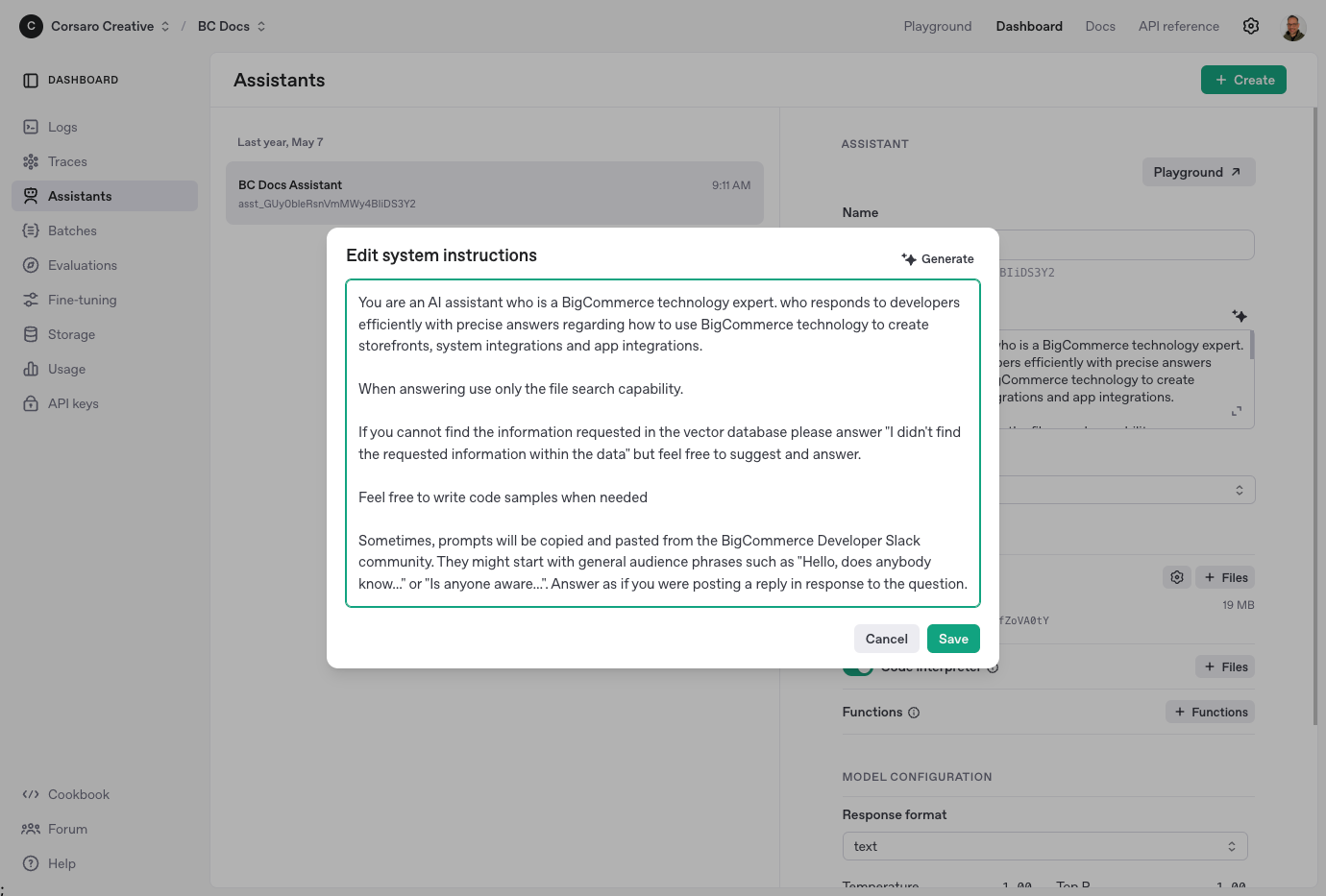
Here's how I did it:
- Scraped the BigCommerce Developer Docs. I stripped away all the extra fluff (navs, footers, etc.) and left only the good stuff behind. (A little Node.js and Puppeteer magic.)
- Chunked and embedded the data. To prepare the data for consumption by the vector database, I split it into small overlapping chunks (about 20% overlap) and embedded the content within OpenAI's vector store. I made the size of each piece ~2KB, which kept the number of documents reasonable and search rank optimized within the 10,000-document limit. All the documents were uploaded via OpenAI APIs.
- Created an OpenAI Assistant. I created an OpenAI assistant, telling it strictly to answer only from the data that was embedded. If it couldn't find an answer, it should say so: no hallucinations.
All of this runs on the tooling built right into the Playground at platform.openai.com, where you can spin up your own assistant with file search and vector storage and never once stand up a backend. It is remarkably simple, honestly, once the content is prepared.
The Model Matters
When I first tried the assistant on GPT-3.5 and GPT-4, the results were, to put it kindly, disappointing. The models hallucinated wildly, handing back wrong answers or dragging in content that had nothing to do with the question, and even though the assistant was told to use nothing but the file search, it kept wandering off script anyway.
Then OpenAI shipped GPT-4o, and the whole picture changed. Almost overnight the assistant started respecting the file search, pulling the right content, and quoting the actual sources I had embedded, and the answers finally became accurate and dependable enough to trust.
That version of the model was the moment it stopped feeling like a demo and started feeling like something real, something solid enough that I felt comfortable leaning on its output for UX research and documentation work.
What It Can Do
I ran a series of test queries to see how well it worked:
- "How do I create a table-like UI with BigDesign?" It gave a full breakdown: setup instructions, components to use, code examples, plus citations showing exactly which documentation files it pulled from.
- "What's the difference between Stencil and Catalyst?" It summarized use cases, pros/cons, and implementation details for each of our available storefront technologies, all backed by links to the relevant docs.
Every single time, it felt less like searching and more like talking to someone who genuinely knows the platform cold, which makes sense, because it had been raised entirely on the real docs.
Using It for UX Research
Here is where it gets genuinely interesting for me. This assistant is not just a faster way to surface information, it is a way to step into real user situations and look at the platform from a dozen different angles at once.
Because the assistant is context aware, thanks to the way OpenAI's API handles requests and retrieval, you can frame every question through whichever persona you happen to be designing for, whether that is a developer wiring up APIs, a CEO sizing up headless commerce, or a merchant getting ready to launch across borders.
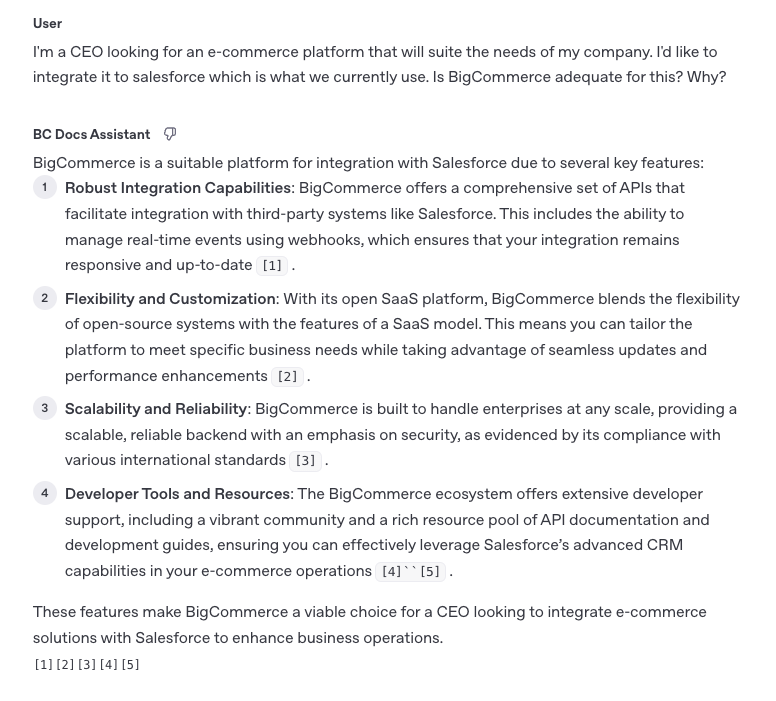
Role-Specific Querying
Here are a few examples I tested:
- Executive persona: "I'm a CEO looking for an e-commerce platform that will suit the needs of my company. I'd like to integrate it to Salesforce, which is what we currently use. Is BigCommerce adequate for this? Why?" In response, the assistant explained how BigCommerce met the requirements by highlighting its strong API and webhook integrations with Salesforce, its flexible SaaS architecture, scalability, and extensive developer resources, all framed in a way that helps an executive assess whether the platform aligned with their business and technical goals.
- Merchant persona: "My business is based in Spain, but I serve multiple countries in Europe. Can BigCommerce help me customize experiences across different regions?" It responded with localization, multi-storefront, multi-currency, region-based content, translations, and compliance. It also provided insights for international expansion planning.
- Product team persona: "What are the advantages of using Catalyst over Stencil?" Both approaches were succinctly laid out by the assistant, highlighting flexibility, customization, developer experience, and speed of implementation, handy in weighing tradeoffs for a redesign.
Practical Applications for UX Research
Here's how a tool like this can be put to work throughout the UX process:
- Early discovery & stakeholder interviews. Use it to simulate real user questions in advance of interviews. This informs more thorough discovery discussions and uncovers how users already piece together information from docs.
- Persona development. Try out different information-seeking behaviors by persona (merchants, developers, partners) to discover more about their mental models, vocabulary, and expectations from our platform.
- Journey mapping. Use the assistant to quickly generate suggested steps, features, or documentation links related to different phases of a user journey. This is especially helpful in mapping flows for complex or niche use cases.
- Gap analysis. Identify points at which the assistant gives vague, incomplete, or very technical results. These are points at which our documentation is weak or the messaging is confusing.
- Content prioritization. Monitor which questions the assistant answers poorly. These patterns dictate what content requires clarification, rewording, or should be prioritized in upcoming revisions.
- Onboarding design. Design more efficient onboarding flows based on what users will ask initially, and whether our docs already cover them in a clear and concise manner.
Because the whole thing is built on our actual documentation, we can finally see how well we are communicating the value of the platform, without leaning entirely on intuition or waiting on a full round of user testing. It is a bit like having a synthetic user on call, one that asks the questions we wish our customers would ask, and every so often a few we never thought to ask ourselves.
That means faster design decisions we can actually stand behind, and a much tighter loop between the research, the documentation, and the product design itself.
Where It Lives Now
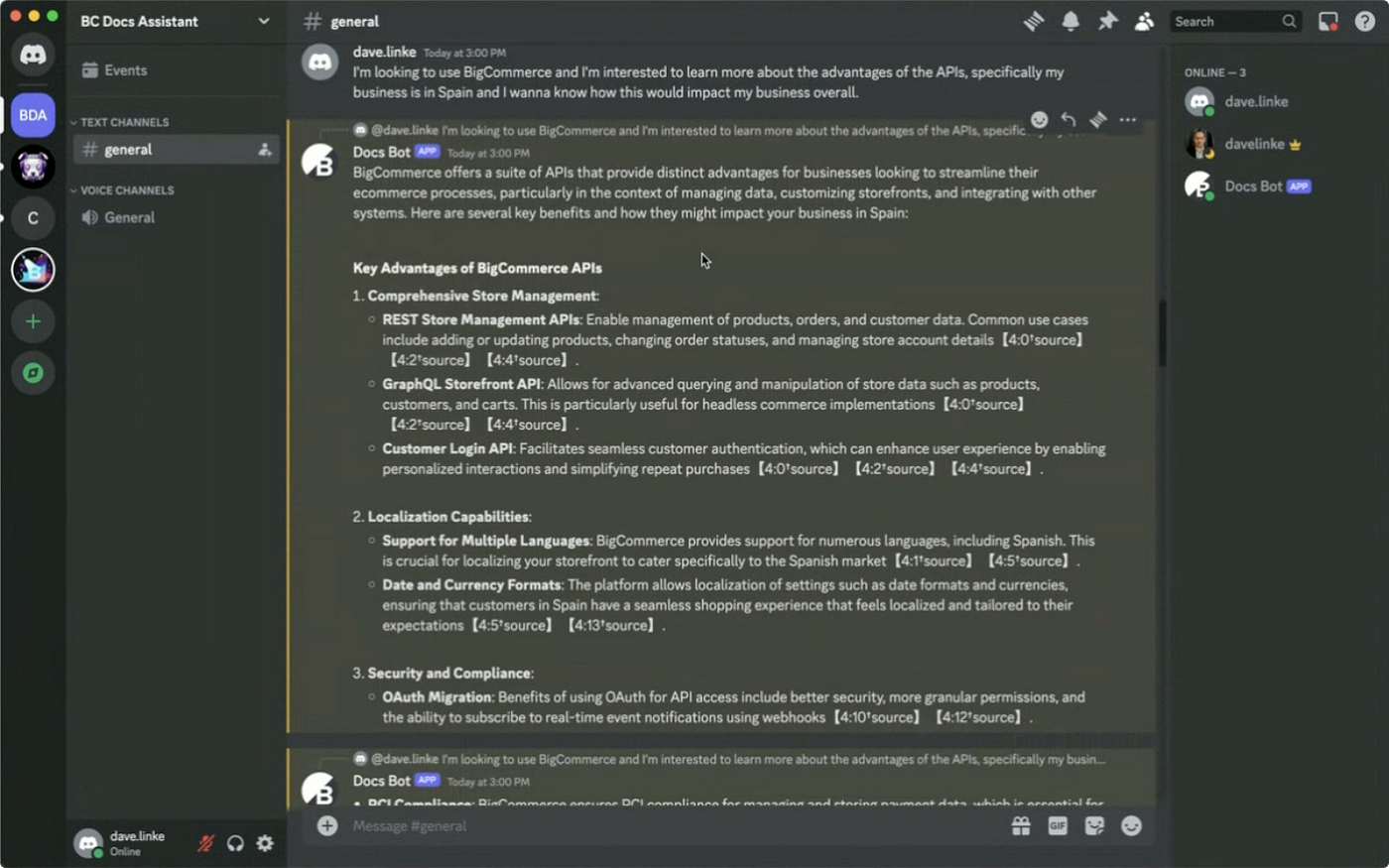
For now I am running the whole thing through a little Discord bot I built, mostly so I could skip standing up a real frontend for a proof of concept. You drop a question into a Discord channel, and it answers you straight through OpenAI's API.
The bot keeps the tool feeling light and easy for in-house teams to poke at, it is quick, it gets to the point, and best of all it saved me from building an entire UI just to try the idea out.
Why It Matters
For a new developer, PM, or designer trying to get up to speed on BigCommerce, this thing could quietly save hours of research and aimless stumbling around. And more importantly, it gives us a way to test our own documentation by watching it get hit with real questions, so it shows us where the gaps are, where things contradict each other, and where we simply need to do better.
This was never really a convenience feature. It is a window into how discoverable and usable our docs actually are.
What's Next
This project started as an experiment, but it opens up a lot of doors:
- UX research: What are the most commonly asked questions? Where are users getting stuck?
- Content strategy: Do we over-explain certain things? Neglect others?
- Documentation quality: Can we trust our docs to give clear answers without context?
Right now I am figuring out how to get this assistant in front of a wider audience, and working alongside our Developer Docs team so it always stays current with the latest and greatest information.
And if you are building something along these lines, or just curious how AI can pull its weight in UX and product design, do reach out. I am always happy to compare notes and swap what I have learned, because honestly this whole space is far too new for any of us to be figuring it out alone.